

Gamified Customer Events App

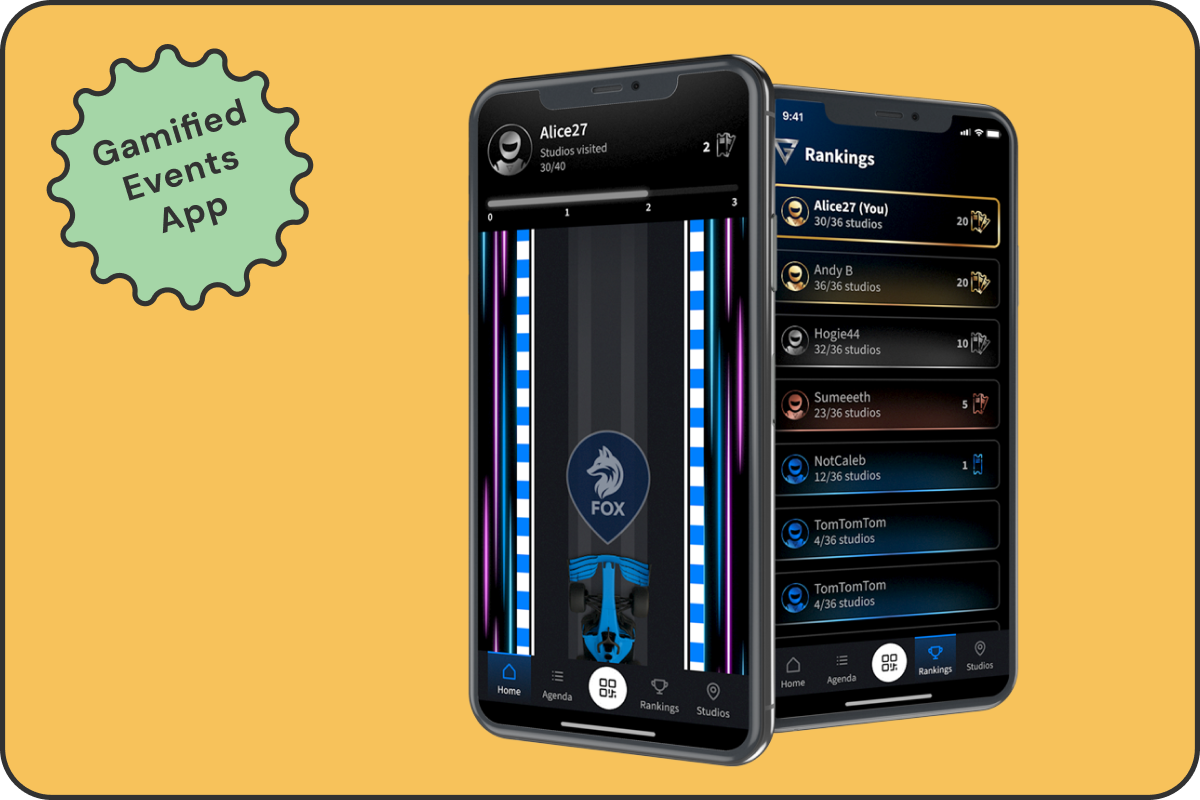
This flagship app was designed to drive engagement at customer events through quests, leaderboards, and collectible tickets. The project included the full product design cycle: requirements, research, design, and testing. The app became a standout success, even earning praise from Jenson Button. at the Monaco event.
screenshot image

VIEW PROTOTYPE IN FIGMA

*Best viewed on desktop

01. OVERVIEW

PROJECT OVERVIEW

This gamified app was developed to help customers explore studio booths during events by scanning QR codes, collecting tickets, and tracking progress. Users could view rankings, see which studios they had visited, and view the event agenda. The experience was designed to be intuitive, visually engaging, and scalable across events.


The entire product was built from scratch and designed around a clear interaction flow: login → onboarding → agenda → studio scan → collect tickets → progress/leaderboard → finish quest. Every screen was designed using scalable, reusable components with clearly named variants, defined states, and consistent patterns. All Figma files were delivered fully dev-ready, supporting quick builds, easy updates, and reusability across future events.

THE PROBLEM

Attendees were often unsure which booths to visit or what to expect from each one. Schedules were shared via printed materials that were easily missed, and there was little incentive for full event participation. With no clear digital solution, the business wanted a lightweight, on-brand app that would spark curiosity, encourage exploration, and simplify access to information.

02. GOALS

USER GOALS

Users needed a fast, no-hassle way to sign in, view the agenda, and understand how to participate in the Quest. Once onboarded, they wanted clear navigation, confirmation when scanning QR codes, and real-time feedback on their progress. The experience had to feel smooth, rewarding, and worth completing

BUSINESS GOALS

The product needed to support engagement and event satisfaction while showcasing studios. It also had to be easy to reuse across multiple events. The project aimed to increase studio visibility, create meaningful interactions between studios and customers, and communicate the event agenda.

03. THE SOLUTION - PART 1

SIGN-IN, ONBOARDING & AGENDA

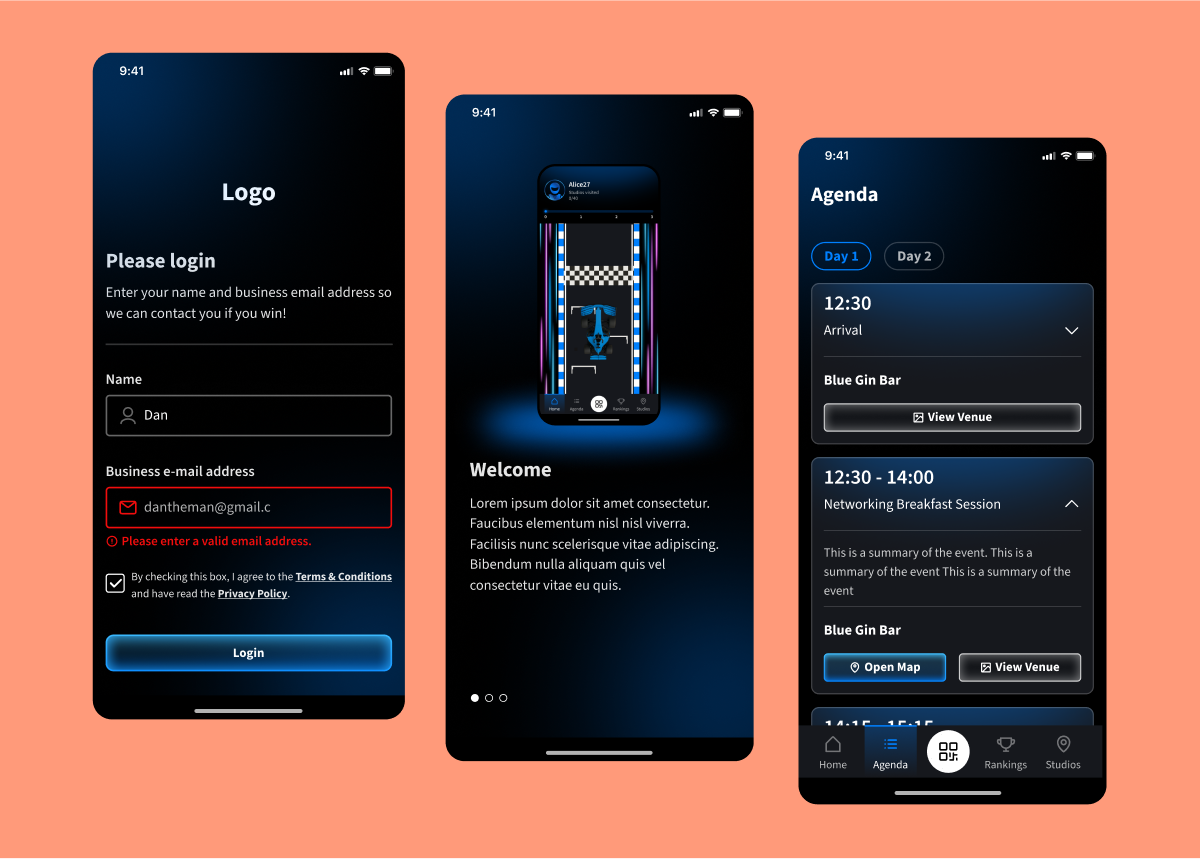
Users landed on a branded sign-in screen with email validation and error handling. A short onboarding flow introduced the Quest and explained how to scan QR codes and collect tickets. From the home screen, the full event agenda was easily accessible, giving users a clear view of session schedules.
screenshot image

04. THE SOLUTION - PART 2

THE QUEST & LEADERBOARD

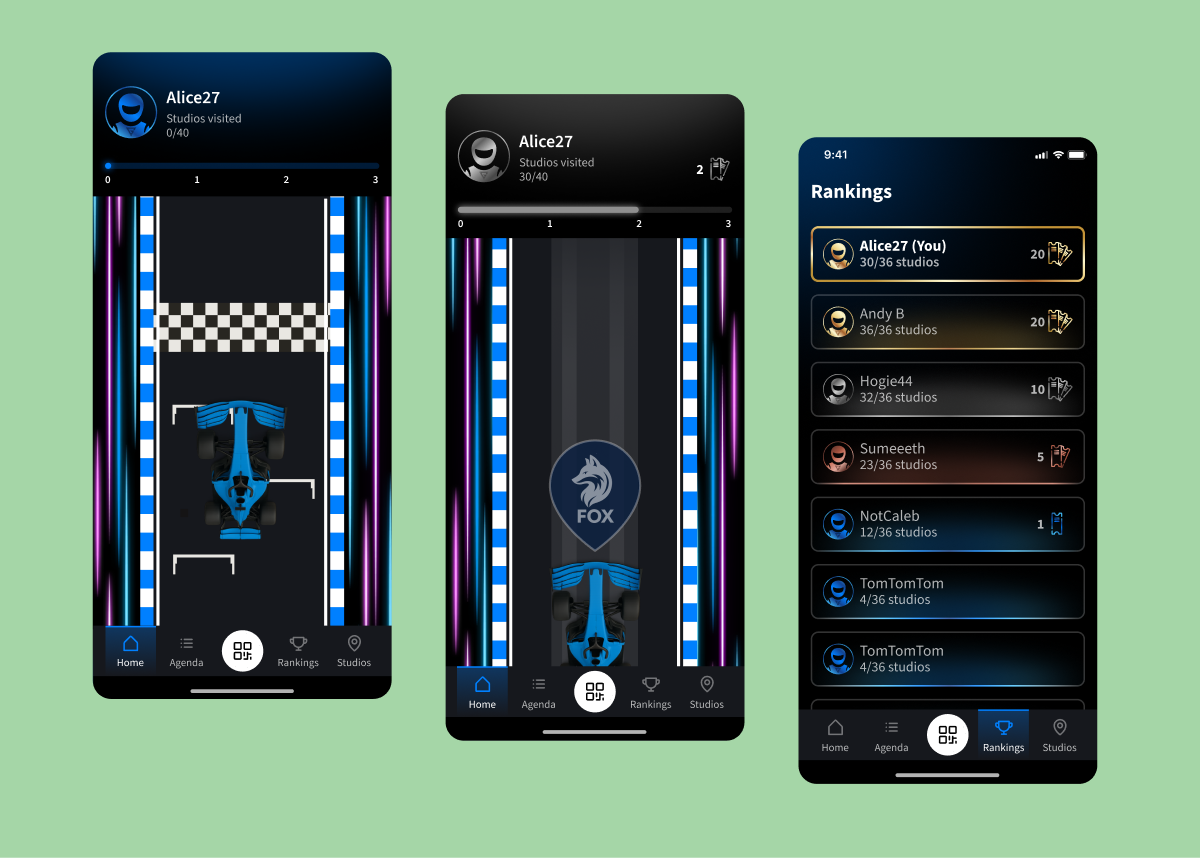
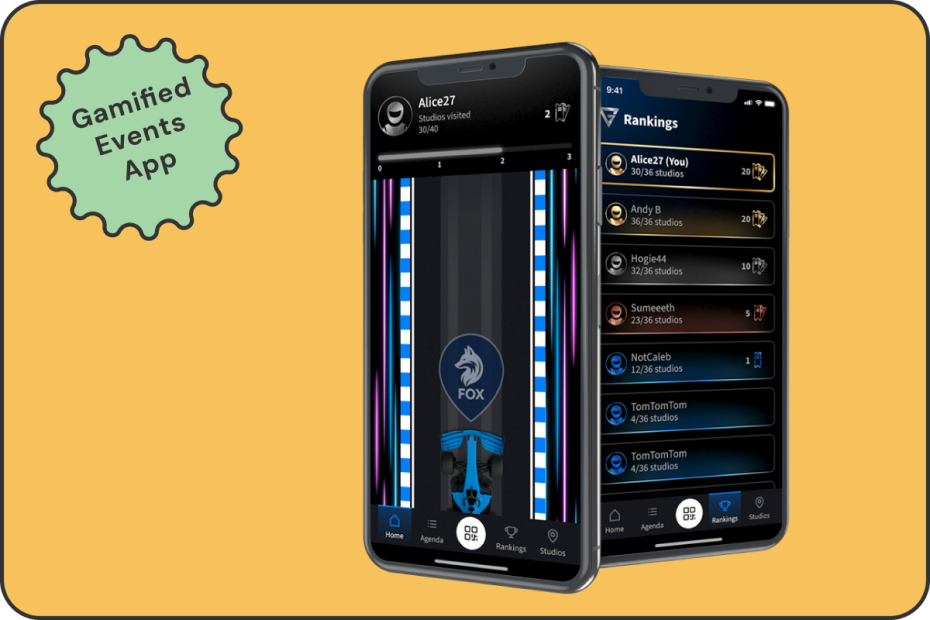
To bring the studio tour to life, users were greeted with a stylised home screen featuring their avatar, visit progress, and a racing-themed home screen. Each scanned QR code triggered a studio badge animation and visually advanced their progress on the track.


This mechanic was supported by real-time feedback and a live leaderboard, encouraging healthy competition. Participants could instantly see how they ranked, and which booths they still needed to explore. The animated interactions and immediate visual updates helped create a playful and rewarding loop that boosted engagement across the event.
screenshot image

05. THE SOLUTION - PART 3

STUDIO INFO & SCALABILITY

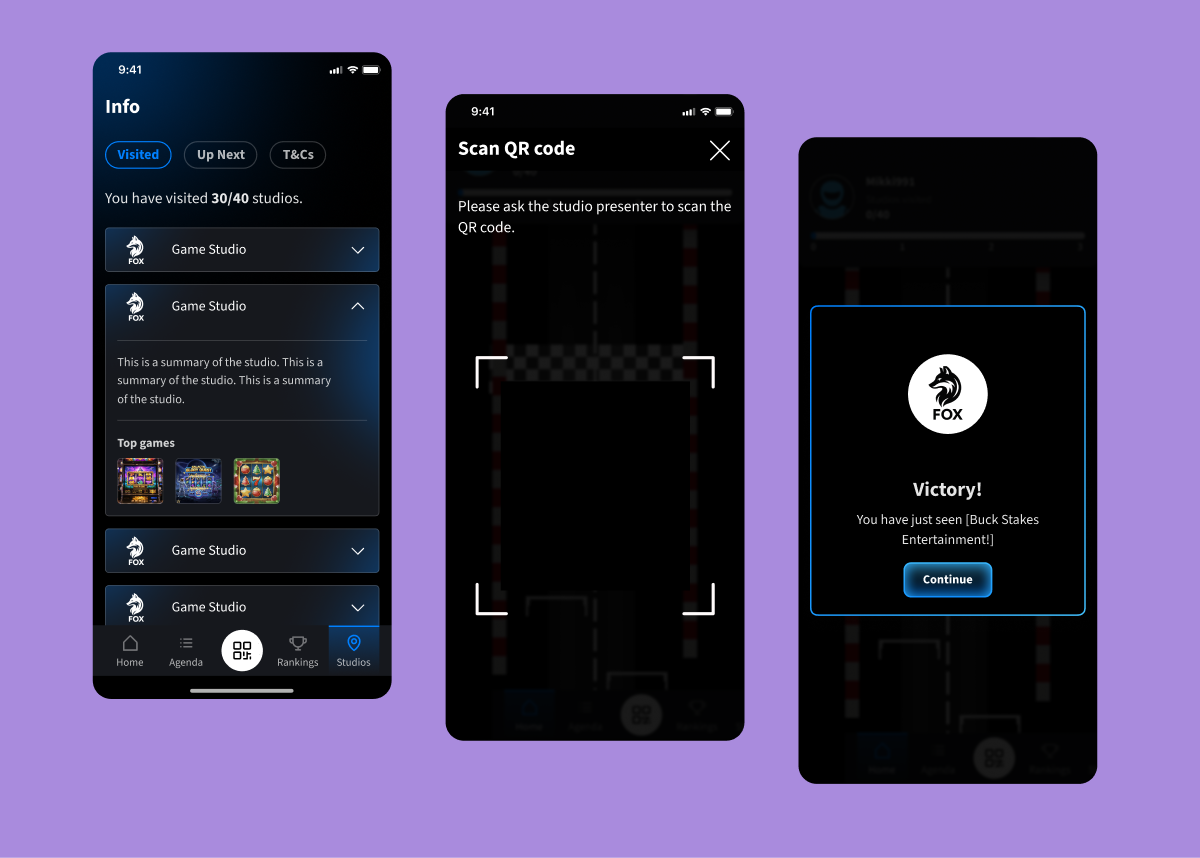
Users could explore studio details, using the bottom navigation. From the Studios tab, they could track which booths they'd visited, learn about each game, and plan what to explore next.
screenshot image

06. RESEARCH & TESTING

To evaluate the app’s usability and engagement, we ran two structured testing phases and a live in-company “Studio Quest” — an Easter-themed pilot that mimicked real event conditions.


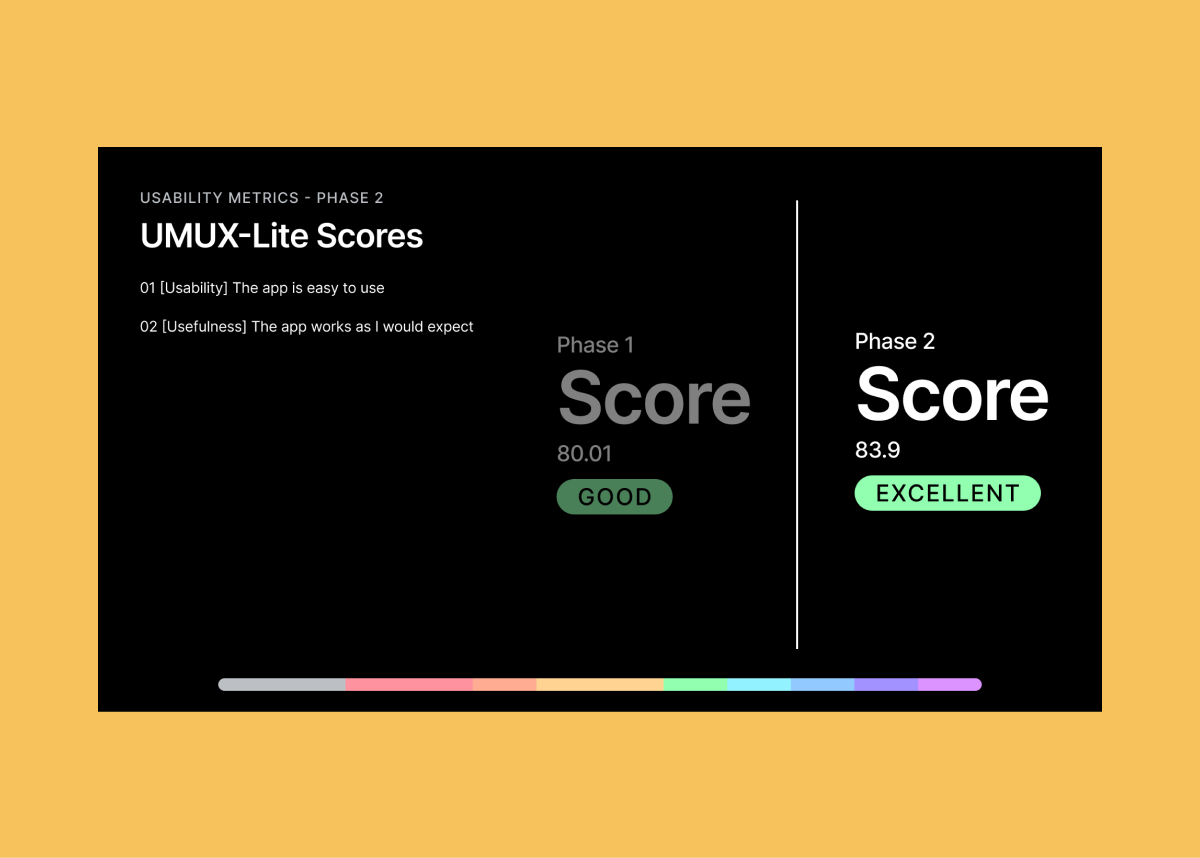
In each phase, participants completed five key tasks while tracking completion rates and collecting both qualitative feedback and UMUX-Lite usability scores. The first round scored 80.01 (Good), which rose to 83.9 (Excellent) after design improvements.


Common issues like scan button discoverability and unclear tap targets led to changes in navigation, labels, and layout. Post-launch feedback from the Monaco event also highlighted feature ideas such as session notifications, contact access, adding tournaments to the app, and prize transparency, which are informed next-phase iterations.
screenshot image

07. REFLECTIONS & NEXT STEPS

The design was well received — 75% of attendees visited over 80% of the studios, 60% actively participated in the Quest, and 50% completed it. Feedback showed users enjoyed the sense of progress, autonomy, and play.


Following the Monaco launch, we began evolving the app into a scalable solution for future events. Ideas in development include avatar onboarding, bonus character scans, tournament integration, live notifications with quiz boosts, and more flexible layout options.

Gamified Customer Events App

This flagship app was designed to drive engagement at customer events through quests, leaderboards, and collectible tickets. The project included the full product design cycle: requirements, research, design, and testing. The app became a standout success, even earning praise from Jenson Button. at the Monaco event.

screenshot image

VIEW PROTOTYPE IN FIGMA

*Best viewed on desktop

01. OVERVIEW

PROJECT OVERVIEW

This gamified app was developed to help customers explore studio booths during events by scanning QR codes, collecting tickets, and tracking progress. Users could view rankings, see which studios they had visited, and view the event agenda. The experience was designed to be intuitive, visually engaging, and scalable across events.


The entire product was built from scratch and designed around a clear interaction flow: login → onboarding → agenda → studio scan → collect tickets → progress/leaderboard → finish quest. Every screen was designed using scalable, reusable components with clearly named variants, defined states, and consistent patterns. All Figma files were delivered fully dev-ready, supporting quick builds, easy updates, and reusability across future events.

THE PROBLEM

Attendees were often unsure which booths to visit or what to expect from each one. Schedules were shared via printed materials that were easily missed, and there was little incentive for full event participation. With no clear digital solution, the business wanted a lightweight, on-brand app that would spark curiosity, encourage exploration, and simplify access to information.

02. GOALS

USER GOALS

Users needed a fast, no-hassle way to sign in, view the agenda, and understand how to participate in the Quest. Once onboarded, they wanted clear navigation, confirmation when scanning QR codes, and real-time feedback on their progress. The experience had to feel smooth, rewarding, and worth completing

BUSINESS GOALS

The product needed to support engagement and event satisfaction while showcasing studios. It also had to be easy to reuse across multiple events. The project aimed to increase studio visibility, create meaningful interactions between studios and customers, and communicate the event agenda.

03. THE SOLUTION - PART 1

SIGN-IN, ONBOARDING & AGENDA

Users landed on a branded sign-in screen with email validation and error handling. A short onboarding flow introduced the Quest and explained how to scan QR codes and collect tickets. From the home screen, the full event agenda was easily accessible, giving users a clear view of session schedules.

screenshot image

04. THE SOLUTION - PART 2

THE QUEST & LEADERBOARD

To bring the studio tour to life, users were greeted with a stylised home screen featuring their avatar, visit progress, and a racing-themed home screen. Each scanned QR code triggered a studio badge animation and visually advanced their progress on the track.


This mechanic was supported by real-time feedback and a live leaderboard, encouraging healthy competition. Participants could instantly see how they ranked, and which booths they still needed to explore. The animated interactions and immediate visual updates helped create a playful and rewarding loop that boosted engagement across the event.

screenshot image

05. THE SOLUTION - PART 3

STUDIO INFO & SCALABILITY

Users could explore studio details, using the bottom navigation. From the Studios tab, they could track which booths they'd visited, learn about each game, and plan what to explore next.

screenshot image

06. RESEARCH & TESTING

To evaluate the app’s usability and engagement, we ran two structured testing phases and a live in-company “Studio Quest” — an Easter-themed pilot that mimicked real event conditions.


In each phase, participants completed five key tasks while tracking completion rates and collecting both qualitative feedback and UMUX-Lite usability scores. The first round scored 80.01 (Good), which rose to 83.9 (Excellent) after design improvements.


Common issues like scan button discoverability and unclear tap targets led to changes in navigation, labels, and layout. Post-launch feedback from the Monaco event also highlighted feature ideas such as session notifications, contact access, adding tournaments to the app, and prize transparency, which are informed next-phase iterations.

screenshot image

07. REFLECTIONS & NEXT STEPS

The design was well received — 75% of attendees visited over 80% of the studios, 60% actively participated in the Quest, and 50% completed it. Feedback showed users enjoyed the sense of progress, autonomy, and play.


Following the Monaco launch, we began evolving the app into a scalable solution for future events. Ideas in development include avatar onboarding, bonus character scans, tournament integration, live notifications with quiz boosts, and more flexible layout options.

Gamified Customer Events App

This flagship app was designed to drive engagement at customer events through quests, leaderboards, and collectible tickets. The project included the full product design cycle: requirements, research, design, and testing. The app became a standout success at the Monaco event, even earning praise from Jenson Button.

screenshot image

VIEW PROTOTYPE IN FIGMA

*Best viewed on desktop

01. OVERVIEW

PROJECT OVERVIEW

This gamified app was developed to help customers explore studio booths during events by scanning QR codes, collecting tickets, and tracking progress. Users could view rankings, see which studios they had visited, and view the event agenda. The experience was designed to be intuitive, visually engaging, and scalable across events.


The entire product was built from scratch and designed around a clear interaction flow: login → onboarding → agenda studio scan → collect tickets → progress/leaderboard → finish quest. Every screen was designed using scalable, reusable components with clearly named variants, defined states, and consistent patterns. All Figma files were delivered fully dev-ready, supporting quick builds, easy updates, and reusability across future events.

THE PROBLEM

Attendees were often unsure which booths to visit or what to expect from each one. Schedules were shared via printed materials that were easily missed, and there was little incentive for full event participation. With no clear digital solution, the business wanted a lightweight, on-brand app that would spark curiosity, encourage exploration, and simplify access to information.

02. GOALS

USER GOALS

Users needed a fast, no-hassle way to sign in, view the agenda, and understand how to participate in the Quest. Once onboarded, they wanted clear navigation, confirmation when scanning QR codes, and real-time feedback on their progress. The experience had to feel smooth, rewarding, and worth completing

BUSINESS GOALS

The product needed to support engagement and event satisfaction while showcasing studios. It also had to be easy to reuse across multiple events. The project aimed to increase studio visibility, create meaningful interactions between studios and customers, and communicate the event agenda.

03. THE SOLUTION - PART 1

SIGN-IN, ONBOARDING & AGENDA

Users landed on a branded sign-in screen with email validation and error handling. A short onboarding flow introduced the Quest and explained how to scan QR codes and collect tickets. From the home screen, the full event agenda was easily accessible, giving users a clear view of session schedules.

screenshot image

04. THE SOLUTION - PART 2

THE QUEST & LEADERBOARD

To bring the studio tour to life, users were greeted with a stylised home screen featuring their avatar, visit progress, and a racing-themed home screen. Each scanned QR code triggered a studio badge animation and visually advanced their progress on the track.


This mechanic was supported by real-time feedback and a live leaderboard, encouraging healthy competition. Participants could instantly see how they ranked, and which booths they still needed to explore. The animated interactions and immediate visual updates helped create a playful and rewarding loop that boosted engagement across the event.

screenshot image

05. THE SOLUTION - PART 3

STUDIO INFO & SCALABILITY

Users could explore studio details, using the bottom navigation. From the Studios tab, they could track which booths they'd visited, learn about each studio, and plan what to explore next.

screenshot image

06. RESEARCH & TESTING

To evaluate the app’s usability and engagement, we ran two structured testing phases and a live in-company “Studio Quest” — an Easter-themed pilot that mimicked real event conditions.


In each phase, participants completed five key tasks while tracking completion rates and collecting both qualitative feedback and UMUX-Lite usability scores. The first round scored 80.01 (Good), which rose to 83.9 (Excellent) after design improvements.


Common issues like scan button discoverability and unclear tap targets led to changes in navigation, labels, and layout. Post-launch feedback from the Monaco event also highlighted feature ideas such as session notifications, contact access, adding tournaments to the app, and prize transparency, which are informed next-phase iterations.

screenshot image

07. REFLECTIONS & NEXT STEPS

The design was well received — 75% of attendees visited over 80% of the studios, 60% actively participated in the Quest, and 50% completed it. Feedback showed users enjoyed the sense of progress, autonomy, and play.


Following the Monaco launch, we began evolving the app into a scalable solution for future events. Ideas in development include avatar onboarding, bonus character scans, tournament integration, live notifications with quiz boosts, and more flexible layout options.