

Archaeological Data Service — Smarter Search for Complex Records
Redesigning the UK’s largest archaeology repository to support faster discovery, better filtering, and easier cross-referencing across millions of detailed records.
01. OVERVIEW
PROJECT OVERVIEW
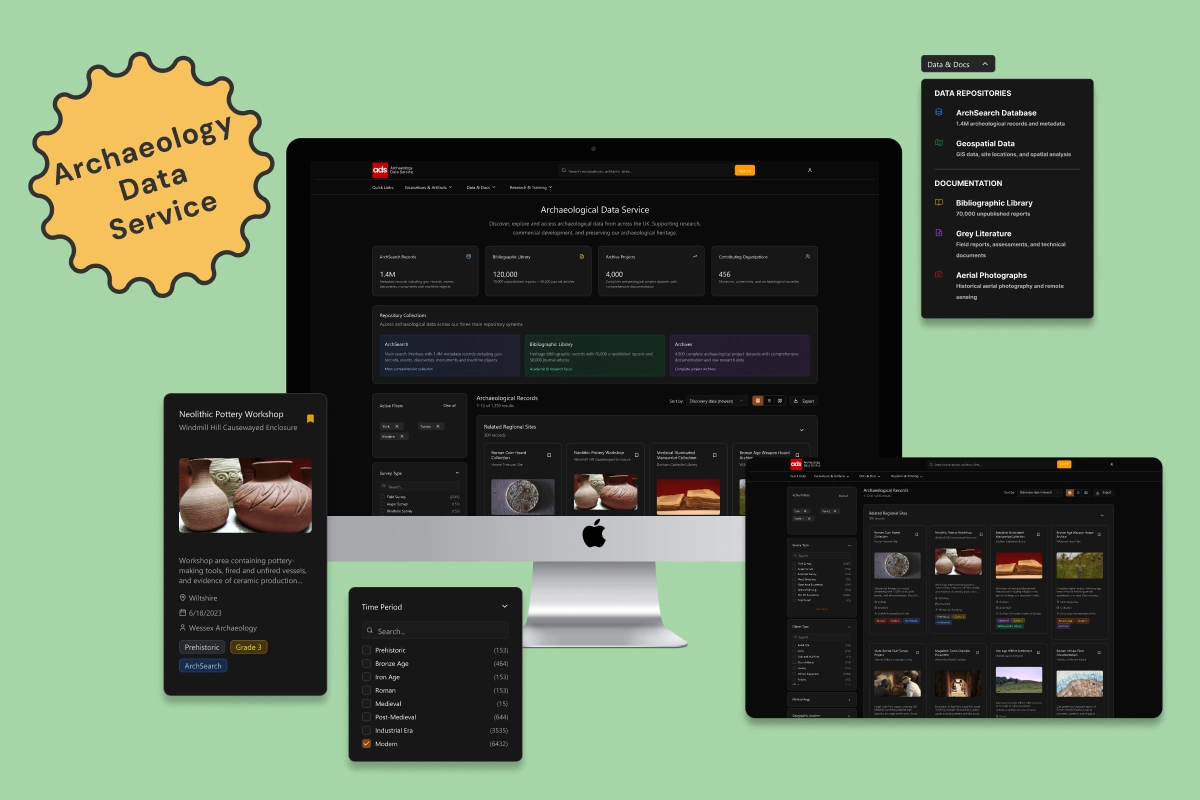
The Archaeology Data Service (ADS) is the national repository for archaeological data in the UK, trusted by academic researchers, commercial field teams, and curators. But despite holding over 1.4 million records (many with unique research value) users often struggled to find what they needed.
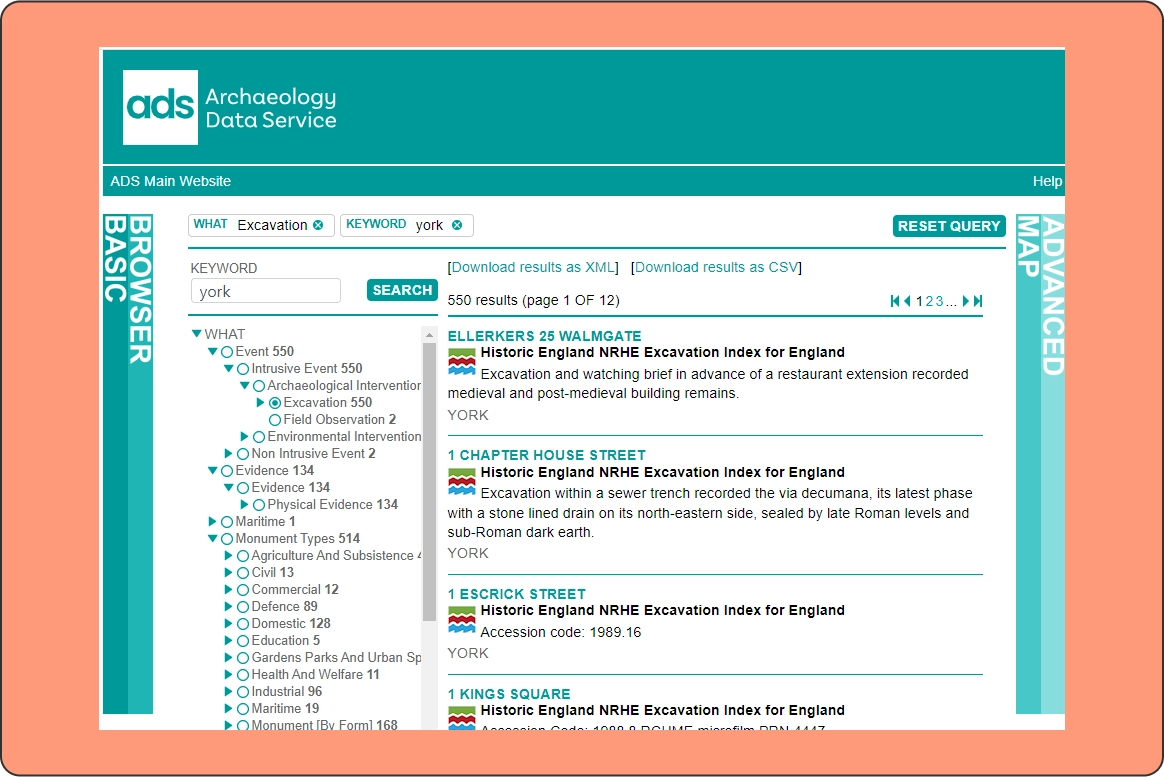
Legacy search interfaces were fragmented across three systems (ArchSearch, Bibliographic Library, and Archives), each with their own structure and quirks. Filters were slow, clunky, and frustrating to use, collapsing after every selection and interrupting search flow. Navigation felt outdated, and there was little clarity around where to begin or how to refine results.
This redesign aimed to unify the experience and radically improve search, filtering, and result clarity, helping users quickly narrow in on the records that matter most to them.
I spent most of the project focused on solving deep UX and usability challenges, and later used Figma Make (an AI-assisted tool) to polish my lo-fi wireframes, generate supporting imagery, and build out the dark theme, allowing more time for problem-solving, not just pixels.
THE PROBLEM
While ADS holds rich and valuable archaeological data, the interface made it difficult to access. Filters were slow, closed after each selection, and disrupted the search flow. Search often returned too many or too few results, with little context to help users refine. There was no clear way to explore content across collections or browse by relevance. Legacy sidebars and advanced search pages felt overwhelming, and the overall experience was clunky, unintuitive, and difficult for anyone not already familiar with the system. As a result, users often struggled to reach meaningful results — or gave up before they did.
02. CURRENT UI
03. GOALS

USER GOALS
Users needed a faster, more intuitive way to find and filter records across all repositories. They wanted to apply filters without friction, understand results without needing expert knowledge, and feel in control of their search from the start.

BUSINESS GOALS
The goal was to transform ADS into a modern, trustworthy digital archive that could better support research, exhibitions, and education. Improving usability would not only increase daily use, but also strengthen ADS’s ability to attract donors, partners, and data contributors — helping ensure long-term impact.
04. DESIGN KPIs
To measure success, the redesign focused on two areas: improving search experience and supporting institutional goals. Key metrics included faster discovery of relevant records, smoother filter use, and higher engagement across all repositories. Business-wise, success was defined by increased dataset reuse, improved perception of ADS as a modern archive, and greater visibility for high-value content — encouraging contributions, funding, and public trust.
05. THE SOLUTION
SMARTER, FASTER SEARCH - BUILT FOR REAL RESEARCH
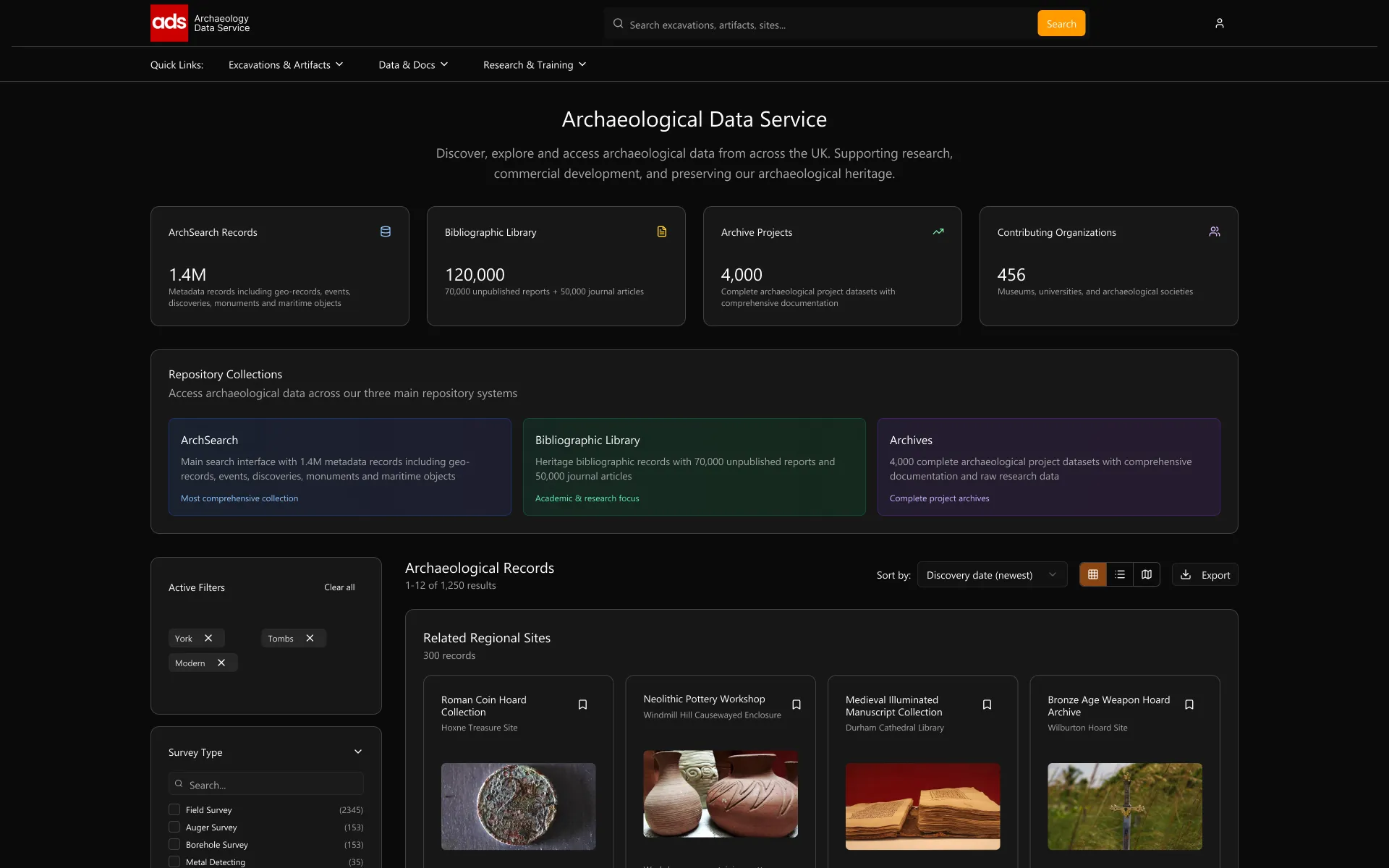
The redesigned Archaeology Data Service (ADS) interface introduces a cleaner, more intuitive way to explore records — no more clunky trees, confusing map tools, or overwhelming side panels. Instead, the focus is on speed, structure, and clarity, with each interaction designed to help users get to meaningful results faster — whether they’re seasoned researchers or new to the platform.
SEARCH THAT SUPPORTS EXPLORATION
The global search bar is now equipped with autocomplete and predictive input, helping users quickly find excavation sites, artifact types, or publication sources — even if they’re unsure how to phrase it. No more zero-result queries or trial-and-error guessing.
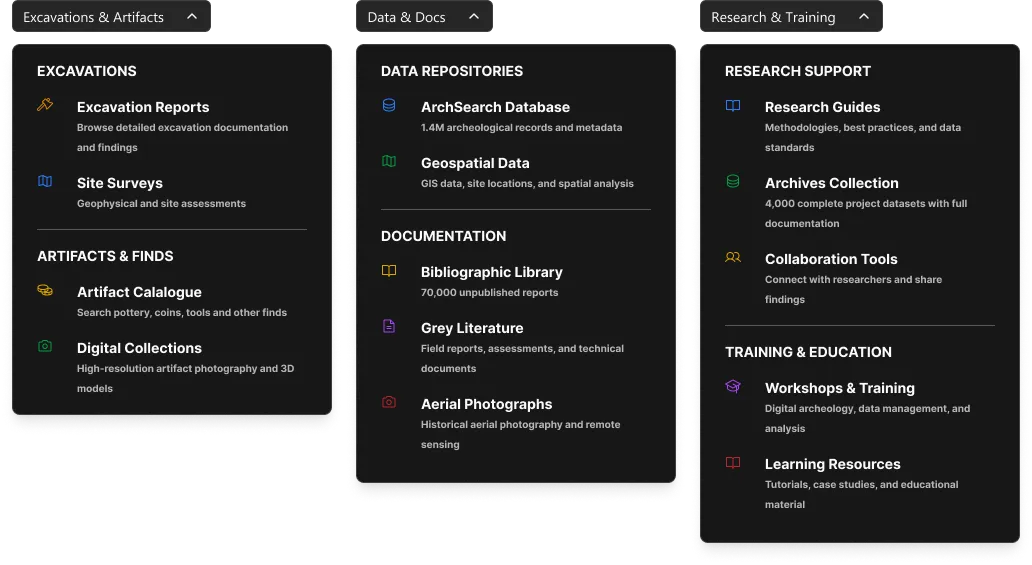
For faster entry points, the redesigned quick links menu provides clear access to records, datasets, bibliographic archives, and more — grouped by real user goals like “Excavations & Artifacts” or “Research & Training.” This removes the need to learn internal system names or bounce between disconnected repositories. Instead of three separate tools, users now start their search from a single, unified experience.
Search and Quick Links
SORT, SAVE & EXPORT
Users can now sort results by what matters most to them — not just by title. Options like Most Referenced, With Images, or Location Proximity surface records with real research value faster, helping users cut through noise and find exactly what they need.
Logged-in users can save records directly to their profile, making it easier to build collections for future reference, teaching, or collaboration — no spreadsheet wrangling required.
Meanwhile, export tools are always visible and just a click away, supporting clean citations, easy downloads, and fast integration into reports or research documents.
SORT
Quick controls let users organise records by discovery date, relevance, proximity, grade, image availability, etc. This makes it easier to surface the most meaningful results fast.
Best match
Newest first
Oldest first
Discovery date (newest)
Discovery date (oldest)
Title A-Z
Title Z-A
Grade (highest first)
Grade (lowest first)
Most referenced
Most linked records
With images first
Without images first
Location proximity
EXPORT
Users can export filtered datasets directly from the results view, simplifying workflows for citations, analysis, and reporting.


Export
SAVE
Logged-in users can now save key records to their profile, giving them a personalised space to revisit important finds, set alerts, and track research interest.
Neolithic Pottery Workshop
Windmill Hill Causewayed Enclosure

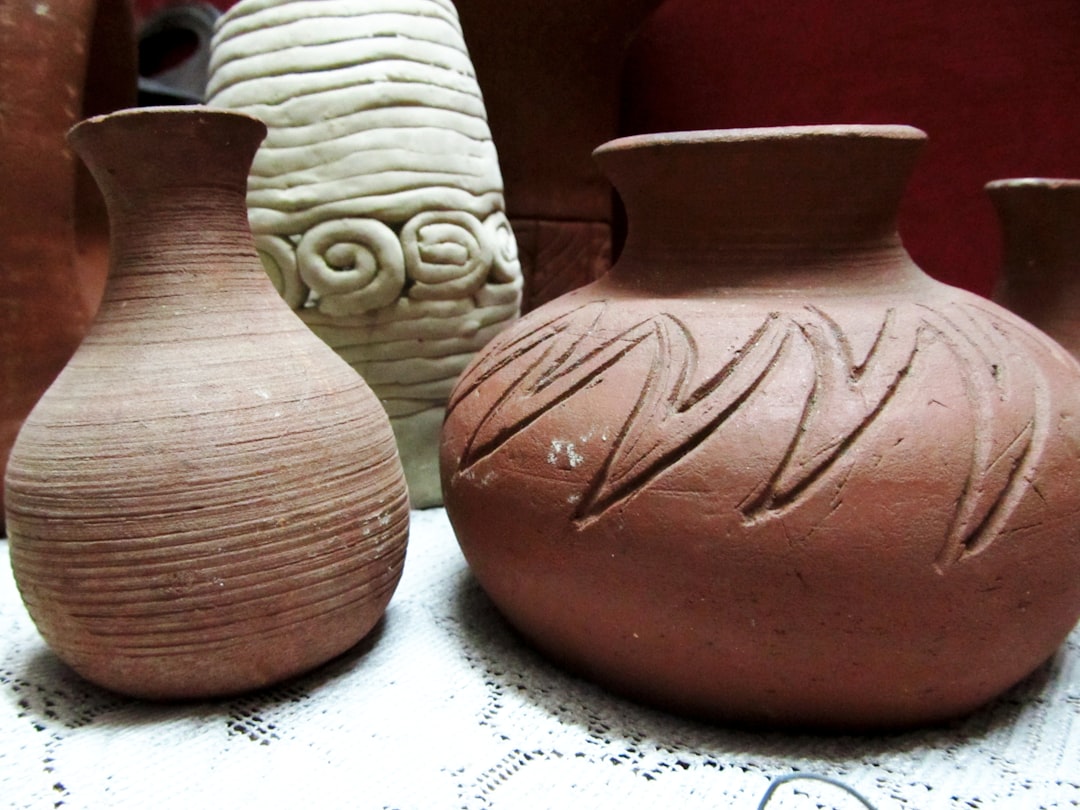
Workshop area containing pottery-
making tools, fired and unfired vessels,
and evidence of ceramic production…


Wiltshire


6/18/2023


Wessex Archaeology
Prehistoric
Grade 3
ArchSearch
REDESIGNED FILTERS
The redesigned filters are fast, structured, and built for real-world research workflows. Sections like Time Period, Survey Type, and Data Type are grouped clearly with checkboxes, search inputs, and result counts. Users can explore options without being overwhelmed — thanks to collapsible categories, consistent patterns, and instant updates that keep everything in view. No page reloads, no lost scroll, just responsive filtering that keeps up with complex queries.
SURVEY TYPE
Survey Type

Search...


Field Survey
(2345)
Auger Survey
(153)
Borehole Survey
(153)
Metal Detecting
(35)
Open Area Excavation
(100)
Remote Sensing
(153)
Test Pit Evaluation
(2345)
Trial Trench
(15)
Underwater Evaluation
(153)
Watching Brief
(153)
View More
OBJECT TYPE
Object Type
Search...
Burial Site
(153)
Coins
(153)
Craft and Maritime
(15)
Glass Artifacts
(153)
Jewelry
(153)
Military Equipment
(1534)
Pottery
(153)

Tombs
(153)
Weapons
(103)
METHODOLOGY
Methodology
Search...
Stratigraphy
(153)
Radiocarbon Dating
(765)
DNA Analysis
(345)
Lidar Analysis
(153)
Artifact Typology
(153)
Soil Analysis
(153)
TIME PERIOD
Time Period
Search...
Prehistoric
(153)
Bronze Age
(464)
Iron Age
(153)
Roman
(153)
Medieval
(15)
Post-Medieval
(644)
Industrial Era
(3535)
Modern
(6432)
DATA TYPE
Data Type
Search...
Reports
(1444)
Grey Literature
(6321)
Aerial Photographs
(155)
Datasets
(153)
Medieval
(3524)
Artifact Images
(1153)
GRADE LEVEL
Grade Level / Significance
Grade level
1
2
3
4
5
Grade 3+
GEOGRAPHIC LOCATION
Geographic Location
Search...
Region

Select region...
York
(153)
Blackpool
(765)
Bournemouth
(345)
Bristol
(1534)
Buckinghamshire
(153)
Cambridgeshire
(153)
Cheshire
(153)
York
(892)
Address
Enter address...
Post Code
Enter postcode...
Coordinates
Enter coordinates...
Search area (km)
1km
20km
40km
60km
80km
30km radius
Map View
Apply
STRUCTURED RESULTS
Records are now grouped by category, like Jewelry or Modern Cemeteries, with collapsible sections and “View More” buttons to reduce scroll fatigue.
Each result card highlights rich, scannable metadata: location, discovery date, grade, and source, with clear category tags (e.g. Prehistoric, Grade 4) and imagery to support quick comparison.
This makes browsing feel structured, fast, and easy, especially when navigating large result sets.
Structured Results for Faster Scanning
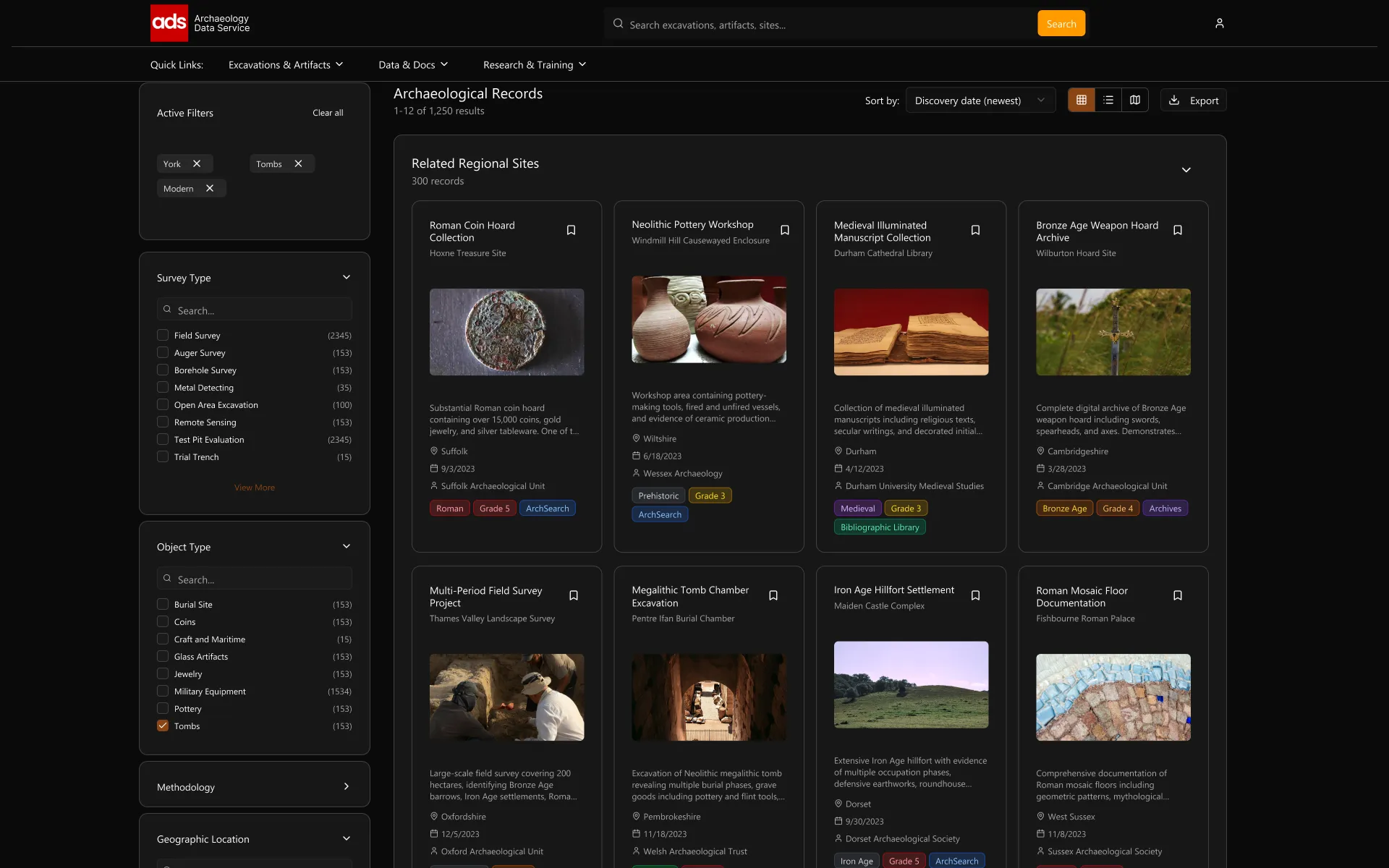
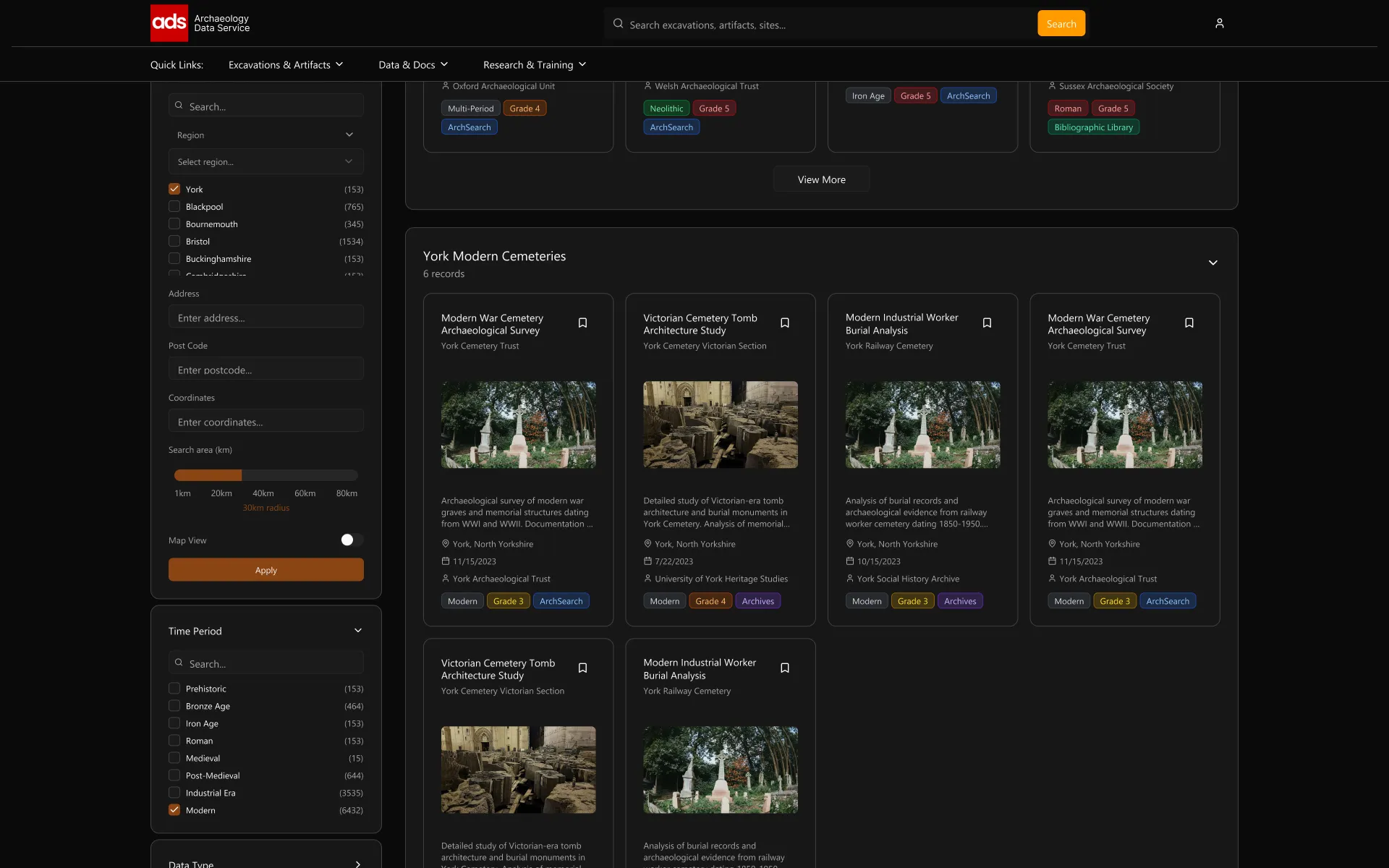
MODERN UI
The interface has been rebuilt with a clean, dark design that prioritizes content and clarity. Filters stay accessible while scrolling, layouts adjust fluidly, and metadata is visualised through clear tags and structure.
The result: a fast, focused workspace designed for serious research.
Modern UI with a Research-First Feel

06. RELECTIONS
This project focused on simplifying the experience of working with complex archaeological data. The main challenge was not the content itself, but the friction caused by outdated tools like clunky filters, overwhelming layouts, and disconnected search systems. The redesign aimed to bring clarity and structure, helping users reach relevant records faster and with more confidence.
While a full mobile version was out of scope, components were designed with responsiveness in mind to ensure the interface could adapt across different devices. I would also like to explore features such as saved searches, user alerts, and visual hotspot mapping to help researchers quickly identify clusters of significant findings.
With more time, I would run usability testing on filter interaction, sorting, and result exploration. Accessibility improvements like keyboard navigation, screen reader support, and color contrast checks would also be an important next step.
Above all, this project was about turning ADS into a modern, usable research tool that supports focused, meaningful work.